
Interactive Airline Roster
More than a roster.
The operational backbone for your crew.
OffBlock turns synchronized roster data into the crew's operational entry point — connecting every duty, flight and rotation with the information and workflows around it.

Connected workflows
Roster change acknowledgement
Fully available offline
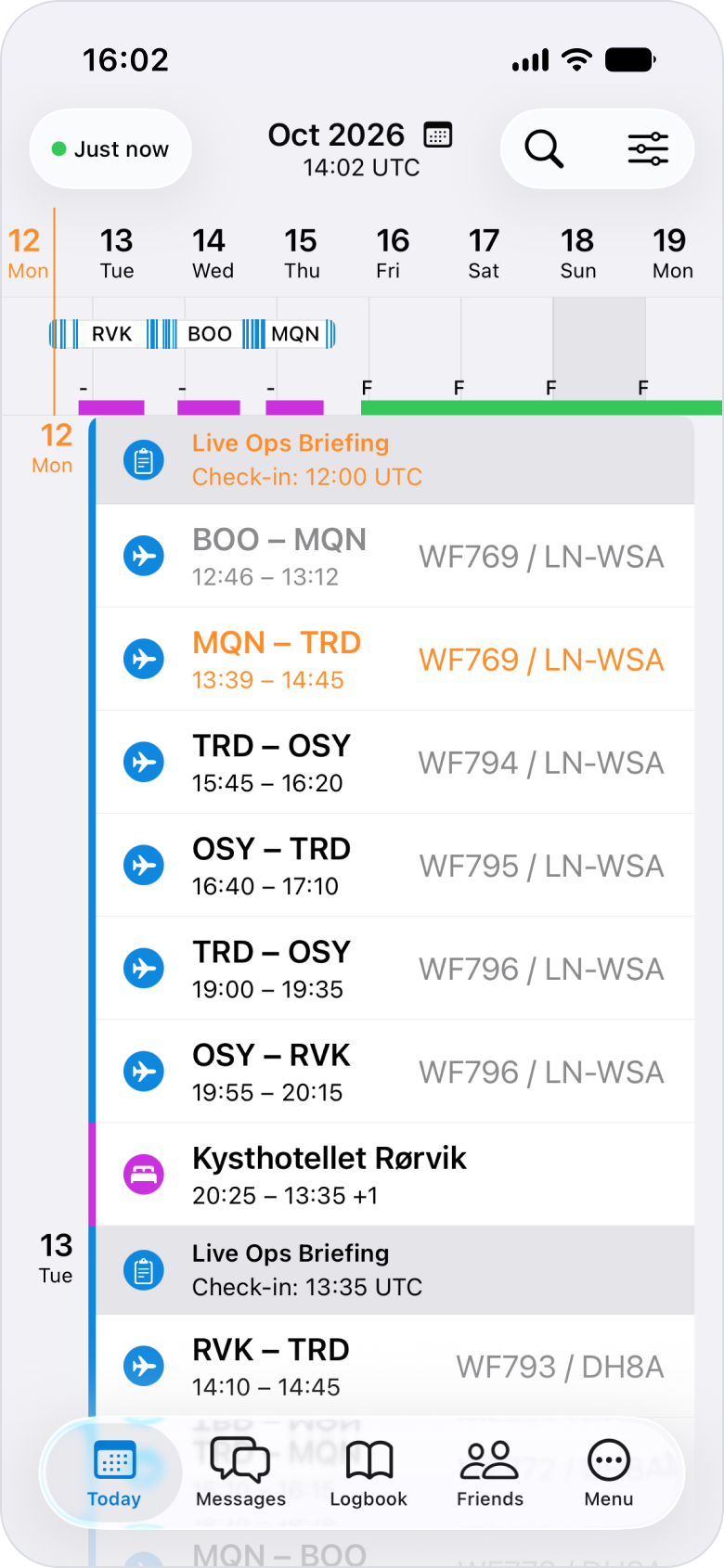
Connected operational context
The roster is where the crew operation connects.
Your Crew Planning System remains the source of truth. OffBlock synchronizes the roster and turns duties, flights and rotations into a connected operational layer for the crew.
From each roster event, crew members can access the information and workflows relevant to their operation — without leaving OffBlock.
The same roster context connects workflows across the OffBlock platform, from Crew Briefing and Operational Communication to Pilot Logbook, Cosmic Radiation and Roster Sharing.
Crew Planning System
→
Interactive Airline Roster
→
Connected Crew Workflows
Roster event
WF411 · BGO → TRD
Actual Times
→
Pilot Logbook
Flight / Crew Assignment
→
Operational Communication
Flight Context
→
Crew Briefing
Flight Data
→
Cosmic Radiation
Duty / Rotation
→
Roster Sharing
Synchronize the roster. Use its operational context across connected crew workflows.
Rotation & roster experience
See the complete operation, not isolated roster events.
OffBlock automatically identifies related roster events and groups flights and duties into complete rotations — giving crew a clear view of how their operation fits together.
Flight details, crew information, hotel stays, simulator duties and other relevant roster information are accessible directly from the schedule.
Roster
→
Rotation
→
Relevant detail
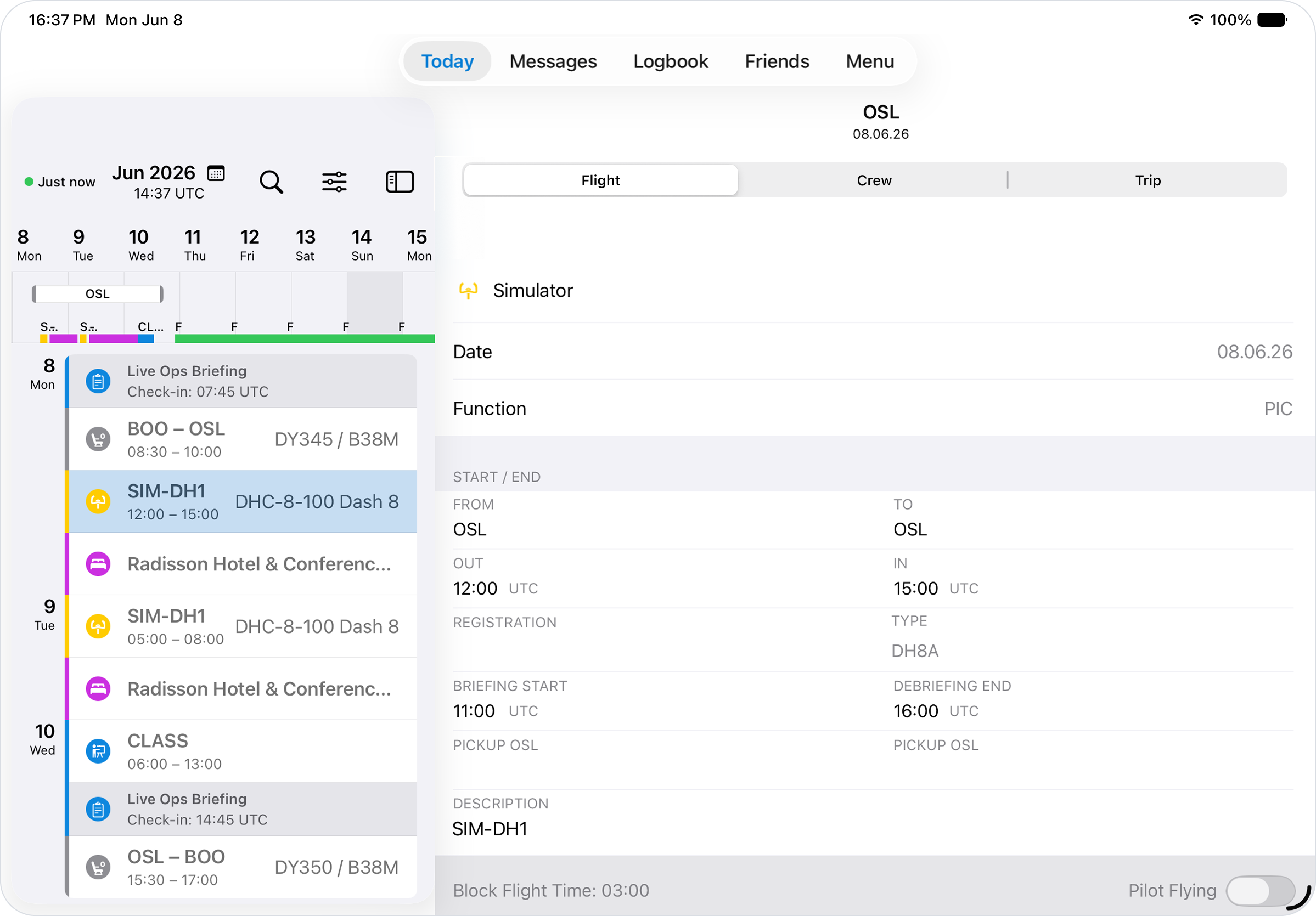
Drop Flight Details UI
Flight Details
Drop Crew Information / Crew List UI
Crew List
Drop Hotel Details UI
Hotel Details
Drop Simulator Duty UI
Simulator Duty
Offline
The complete roster and its associated details remain available offline.
Roster change management
Roster changes that close the loop.
When a roster changes, OffBlock detects the update and notifies the affected crew member. Where supported by the Crew Planning integration, changes can be acknowledged directly in OffBlock and the acknowledgement is returned to the source system.
So Crew Planning can see when a change has reached the crew — without introducing another disconnected process.
Closed loop
Crew Planning System
↓
Roster Change
↓
Push Notification
↓
Crew Acknowledgement
↓
Crew Planning System
Acknowledgement return depends on the Crew Planning integration.
Escalated notifications · Optional add-on
No acknowledgement? Let automation take over.
When a crew member does not respond within a defined time, OffBlock can automatically move through predefined escalation steps — from additional messaging channels to an AI Voice Agent contacting the crew member directly.
Only unresolved cases need to reach Crew Planning.
Push Notification
↓ No acknowledgement within defined time
Additional Messaging Channel — e.g. SMS / WhatsApp
↓ Still no acknowledgement
AI Voice Agent
↓ Unresolved
Crew Planner
Automation handles the follow-up. Crew Planning handles the exceptions.
Operational value
One roster. Value across the operation.
For Crew
One place to start every duty.
Flights, duties and rotations stay connected to the information and workflows around them — with the complete roster available offline.
For Crew Planning
Focus on exceptions, not follow-ups.
Roster change notifications, acknowledgements and optional escalation workflows reduce repetitive manual follow-up and keep Crew Planning focused on cases that require human intervention.
For Airline IT & Flight Operations
Connect existing systems. Make their data operationally useful.
OffBlock brings relevant data from existing airline systems together and makes it available across connected crew workflows — without replacing the operational source systems already in place.
See how OffBlock connects the crew operation.
Explore how Interactive Airline Roster can work with your existing operational systems and crew workflows.