
Live Operations
The right information.
Right when it matters.
OffBlock brings operational data into the context of each crew member's duty, flight phase and role — keeping what matters now in focus and helping crews respond faster when the operation changes.

Context-aware dashboard
Live operational data
Live Activities on iOS & Android
Briefing
Drop the dashboard in Briefing — countdown, inbound, weather, crew, fuel
Boarding
Drop the dashboard in Boarding — countdown, gate, progress, ETD, CTOT
Turnaround / Next Sector
Drop the dashboard in Turnaround — next sector, boarding countdown, next gate, ETD
Same operation → changing phase → changing information priority
iOS · Lock Screen / Dynamic Island
Drop the iOS Live Activity — Boarding in 07 min · Gate A14 · 87 / 112 boarded
Android · Live update
Drop the Android ongoing update — Boarding in 07 min · Gate A14 · 87 / 112 boarded
Operational context
From operational data to operational context.
Airlines already have the operational data. The challenge is putting the right information in front of the right crew member at the right moment.
OffBlock brings relevant data from airline systems and external providers together and places it in the context of the crew member's current duty, flight phase and role.
As the operation progresses, Live Operations adapts what it puts in focus — from report and briefing to boarding, departure, arrival, turnaround and layover.
Operational data
Aircraft / Inbound
Pax / SSR
Boarding
Gate
STD / ETD
CTOT / Slot
Weather
Crew
Fuel
Operational Notices
Hotel / Layover
Airline Systems + External Data Providers
↓
OffBlock operational context
LIVE OPERATIONS
Duty Phase × Flight Status × Crew Role
↓
Live Ops Briefing
Complete duty overview
Live Ops Dashboard
Dynamic operational focus
Live Activities
Critical information outside the app
↓
What matters now
Duty Phase × Flight Status × Crew Role → What matters now
Live Ops Briefing & Dashboard
The complete duty when you need the overview.
What matters now when you don't.
Live Ops Briefing
Your complete operational day.
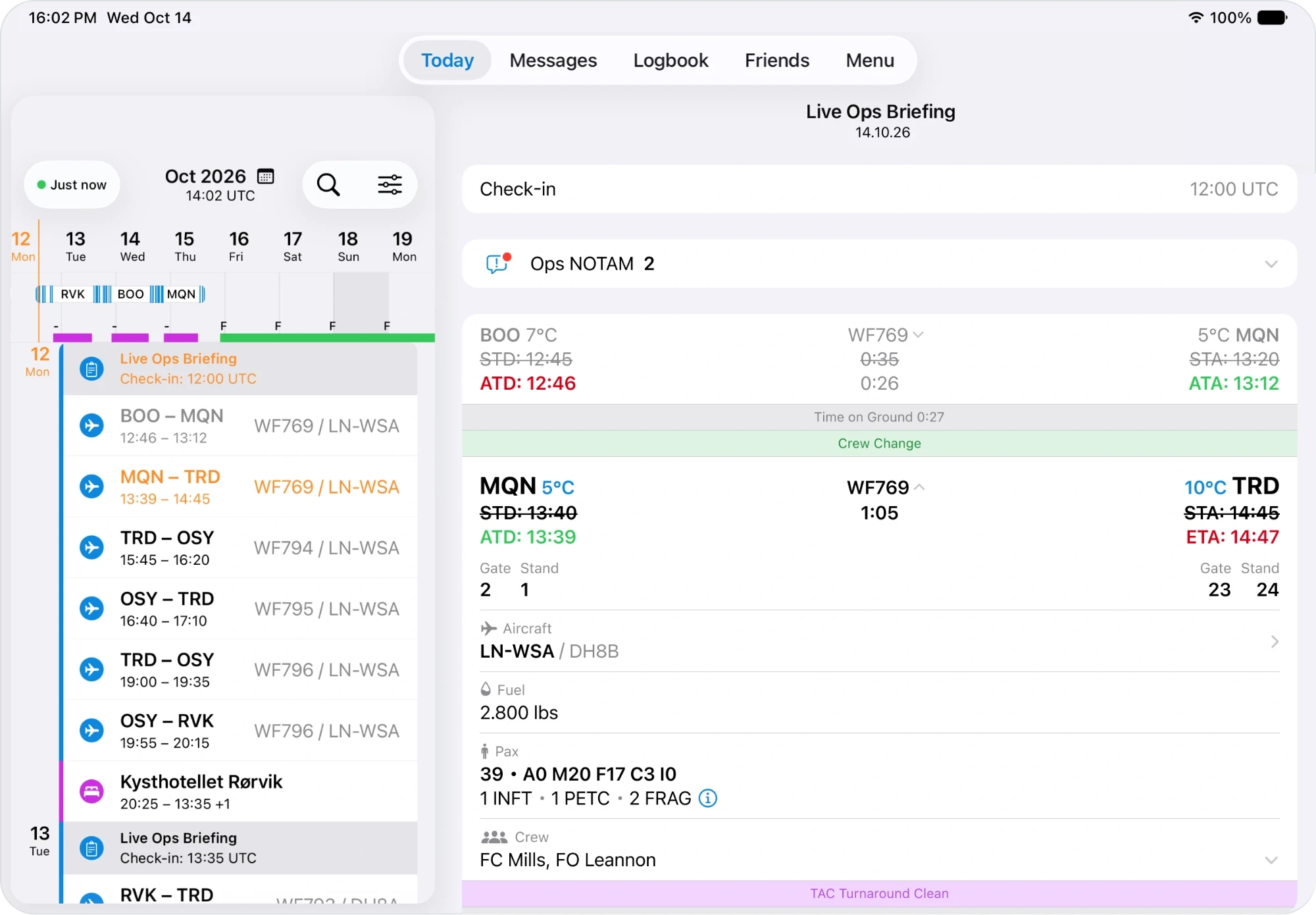
Live Ops Briefing provides a structured overview from report to release, bringing the information around each duty and flight into one operational view.
Flights, crew, passenger information, SSRs, seat maps, aircraft journey and inbound status, weather, operational notices, fuel information, gates, delays and layover details stay connected to the relevant part of the duty.
It gives crew the complete picture of their operational day — including what happened before, what is happening now and what comes next.
Report
Flight
Turnaround
Flight
Layover / Hotel
Release
Live Ops Dashboard
Your operation, dynamically prioritized.
The Live Ops Dashboard turns operational context into a dynamic entry point for the crew app.
As the duty progresses, the dashboard automatically changes what it prioritizes — based on the current flight phase, operational status and crew role.
Upcoming Duty
→
Report
→
Briefing
→
Boarding
→
Departure
→
Airborne
→
Arrival
→
Turnaround
→
Hotel
Report countdown, first sector, location, briefing entry point
Upcoming / Report
Sector, inbound aircraft, weather, pax / SSR, crew, fuel, notices
Briefing
Boarding countdown, gate, progress, ETD, CTOT / slot
Boarding
Arrival status, next sector, next gate, next boarding countdown
Arrival / Turnaround
Hotel / layover and next-duty information
Hotel / Layover
Instead of presenting every available data point with the same priority, OffBlock keeps the information relevant to the current situation in focus.
Where airline data and processes differ, the experience can be adapted to the available operational data and role-specific requirements.
The dashboard changes because the operational context changes.
Live Activities on iOS & Android
Stay with the operation without opening the app.
Time-critical information should not require crew members to repeatedly open an app.
Live Activities bring selected operational information directly to system-level surfaces on iOS and Android and can update as new information becomes available. On iOS, this includes the Lock Screen and Dynamic Island; on Android, the equivalent ongoing live-update experience keeps relevant operational information visible without requiring the crew member to open OffBlock.
Crew can follow upcoming milestones and changing operational conditions at a glance — from briefing and boarding countdowns to gate changes, boarding progress, ETD and slot times.
Briefing
Briefing in 18 min
Boarding
Boarding in 07 min · Gate A14
Gate Change
Gate changed · A14 → B08
Boarding Progress
Boarding · 87 / 112
Departure / Slot
ETD 14:35 · CTOT 14:42
iOS · Lock Screen & Dynamic Island
Drop the iOS Live Activity states — Lock Screen and Dynamic Island following one flight
Android · Ongoing live update
Drop the Android live / ongoing update states following the same flight
Data availability and update frequency depend on connected airline systems and/or external providers.
Critical operational information stays visible as the operation changes.
IROPS
When operations change, every minute matters.
During IROPS, knowing that something changed is only the first step. Crew also needs to understand what matters now and what comes next.
Delays, aircraft changes, gate changes, revised departure times, slots and boarding progress can quickly change the operational picture. OffBlock keeps relevant updates in the context of the current duty and flight phase — reducing the need to search across different sources or repeatedly check for new information.
This helps keep crew aligned with the changing operation and enables them to respond faster as conditions evolve.
Original operation
Inbound on time
Gate A14
STD 14:20
Normal turnaround
Operation changes
Inbound +18 min
Revised ETD
CTOT / slot
Gate change
Changed boarding timing
What matters now
Revised milestone / countdown
Current gate
Next relevant action
Latest departure / slot information
Next-sector context
Change in operation → Change in context → Change in what crew sees
Less searching for operational updates
Relevant information is brought into the current operational context instead of requiring crew to continuously look for it.
Better alignment between crew and the operation
Changing operational information stays connected to the flight, duty and phase where it matters.
Faster response when conditions change
Crew can identify relevant changes earlier and understand what requires their attention next.
Better-informed crews can respond faster to changing operational conditions and support a more effective recovery.
Operational value
One operational context. Value across the airline.
For Crew
Know what matters now.
Move through the duty with the relevant information in focus — from briefing and boarding to turnaround and layover.
For OCC & Flight Operations
Keep crew aligned with the operation.
Bring changing operational information directly into the crew experience and reduce the need for routine information searches and status requests.
For Airline Operations
Support more effective disruption recovery.
Give crews better operational context when conditions change, helping them react faster and stay aligned during IROPS.
For Airline IT & Digital
Connect existing systems. Make their data operationally useful.
OffBlock brings relevant data from airline systems and external providers together in one crew-facing operational context — without replacing the operational source systems already in place.
The standard Live Operations experience can be adapted to the airline's available data, operational processes and role-specific requirements.
See Live Operations in action.
See how OffBlock can turn your existing operational data into a context-aware crew experience — throughout normal operations and when conditions change.
Request a demo